

Galactic Assistant / Interface sound design
Give the future a voice.
4.7 / 5 73 reviewsBuild the beeps, signals, and intricate interfaces of worlds that do not exist yet.
 SoundMorph / Instrument series
Galactic Assistant
Galactic Assistant is the first synthesizer software specifically made for creating hi-tech interface sounds.
Pairs well with
Galactic Assistant

Limited-time bonus
A Secret Library. Yours free.
Any purchase. Now through Black Friday.
Delivered at the end of Black Friday, November 27, 2026.
About the bonus
Last year’s surprise was Spark.
Tesla sparks, electrical textures and vintage machines. Explore Spark and read customer reviews to discover what last year’s surprise delivered.
Explore Spark & read reviewsThis year is still under wraps.
Make any purchase now through Black Friday to receive this year’s mystery sound library free. We’ll reveal and deliver it at the end of November 27, 2026.
Compatibility at a glance
- Formats
- Standalone applicationRuns outside your DAW.
- Supported systems
- macOS 10.14+ · Windows 7+Multicore processor · 2 GB RAM
- Apple Silicon
- CompatibleUse the current Mac installer.
- Demo limitations
- No demo offeredFull version available to purchase.
Specifications at a glance
Galactic Assistant is compatible with Apple Silicon chips (M1 and higher).
An Intel® Mac with Mac OS X 10.14 (or later), OR a PC with Windows 7 (or later); Multicore processor; 2 GB RAM; 1024×768 display.
“Awesome plugin for unique random sound fills and accents to your projects!”
Watch & listen
Hear Galactic Assistant in action.
Demos and walkthroughs. Press play to listen.


The First Ever User Interface Synth.
If you have any questions, you are always welcome to contact us. We'll get back to you as soon as possible, within 24 hours on weekdays.
-
Digital delivery
Access your purchased sounds and software through your SoundMorph account. Log in to your library. If a purchase is missing, contact us with your order number.
-
Customer support
Need help with a download or installation? Contact our team with your product, operating system, and a description of the issue. Never send your password.
-
Questions before buying?
Find answers about account access, licensing, and Universe membership in our FAQ.
-
Contact SoundMorph
Get in touch about a product or order. For team licensing or custom sound design, tell us about your studio.
Advanced UI Synth
Build your sound toolkit.
Included in these bundles
Get Galactic Assistant with more.
-
Universe Bundle
The complete collection
$999View bundle
“Great Sounds very well produced. Best in the industry.”
Specifications & compatibility
Key Features
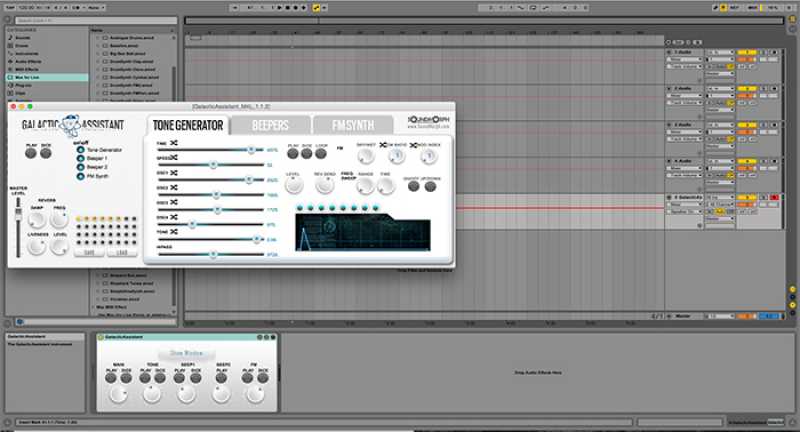
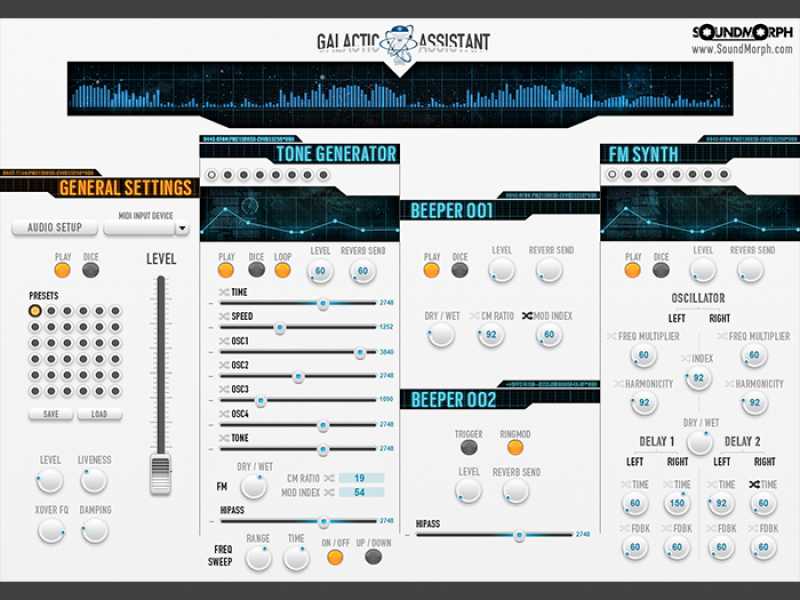
- - One tone generator
- - Two beep generators
- - One FM synth module
- - Save and recall presets
- - Randomized parameters
- - Record and export audio files
- - Shift click to midi learn any Ui controller
System Requirements
Galactic Assistant is compatible with Apple Silicon chips (M1 and higher).
An Intel® Mac with Mac OS X 10.14 (or later), OR a PC with Windows 7 (or later); Multicore processor; 2 GB RAM; 1024×768 display.

I own SoundMorph, so I'm biased! This is a test review, but be sure to review the other reviews too! :)
Great Sounds very well produced. Best in the industry.
Galactic assistant was alright I've just seen as complex synths in plugins
Amazing Realistic and sound quality is out of if this World
I got this for free.
How Impressive!
tooop
Wonderful
Some problem with the installation.
I'm on mac. I don't achieve to use it as a classic Vst. I must use reaktor.
It work okey, but it need more setup that i would like to have.
Awesome plugin for unique random sound fills and accents to your projects!
the sounds are top notch.The only 3 stars is because there is no vst version, the plugin cannot be hosted in a DAW. Although there is a Reaktor version included, this does not work: 1. it says Reaktor works in demo mode 2. even it it loads into Reaktor, it does not make sound then. So sad, because the sound design possibilities could be so much fun. It daw integration was just better, I'd give 5 stars.
The tools are really nice to use and they are perfect for sound design
Awesome
B.J
Nice little helper for sound effects, not exactly whatI was looking for but it's fun to explore its possibilities
Great plugin - love it!
Galactic Assistant is really fun and super easy to use. The sounds are inspiring and instantly spark creativity. As a hobby musician, it’s a great tool to quickly shape fresh ideas.
Still playing with Galactic Assistant, but so far so fun! Wide variety of settings and different effects. Beautiful!
Easy to use, I is not very expensive but still feels useful. and has the best Synth sounds, FX and Textures.
very good BUT i thought it was a VST
Great for its purpose!
M4L is so blessed, but utility isn’t useful so much.
Nice and good for sound design!
Such a useful tool!
I like that provides various application format such as Max and Reaktor. Amazing futuristic ui sounds are easily created by just one click. that’s awesome.
Easy to use interface, I can see it being useful for generation quick interface sounds off the cuff. UI is a little dated but its a small complaint for something that is not very expensive but still feels useful . Put your recordings through some other FX and you can get even more interesting textures.
Do you need future UI sounds? This is your go-to product.
A great tool for all sorts of UI sound effect. Easy to use but deep enough to create a wide palette of sounds.
Fast and intuitive, very useful for Sci-Fi UI sounds
Galactic Assistant is really good at what it's meant for : UI Sounds, it's fast to get nice results and a huge variety of beep, tick, boops and pocs !
Awesome little tool! Just a lot of fun!
Chunky interface
Hey Willem, sorry to hear you feel that way. Write to us at info@soundmorph.com and let us know what you'd like to see changed? Most users have seemed to love it, but we welcome constructive feedback for sure!
Simple and fun to use!