Key Features

  • Controlled-chaos sound design workflow centered around instant shuffle-based generation.
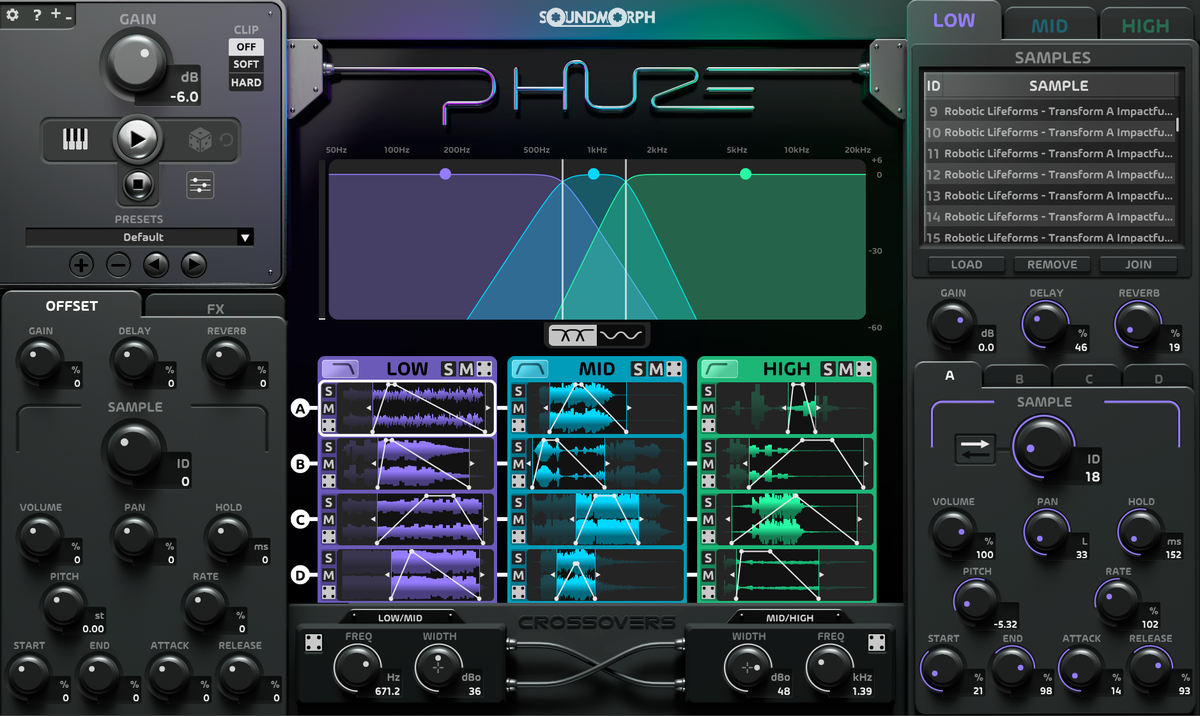
  • 3-band engine with Low, Mid, and High split processing.
  • 12 sound emitters total, with 4 sound emitters per band.
  • Per-emitter control over sample, reverse, volume, pan, hold, pitch, rate, start, end, attack, and release.
  • Per-parameter shuffle ranges, plus the ability to disable shuffle on any dial.
  • Shuffle Scope window for excluding entire parameter categories from shuffle.
  • Global Offset controls for reshaping all 12 emitters at once.
  • Adjustable crossover frequencies, widths, and band gain controls.
  • Built-in delay and reverb with per-band sends.
  • Clipper with Soft, and Hard mode.
  • Load your own files by drag-and-drop, with up to 60 samples per band.
Download Demo

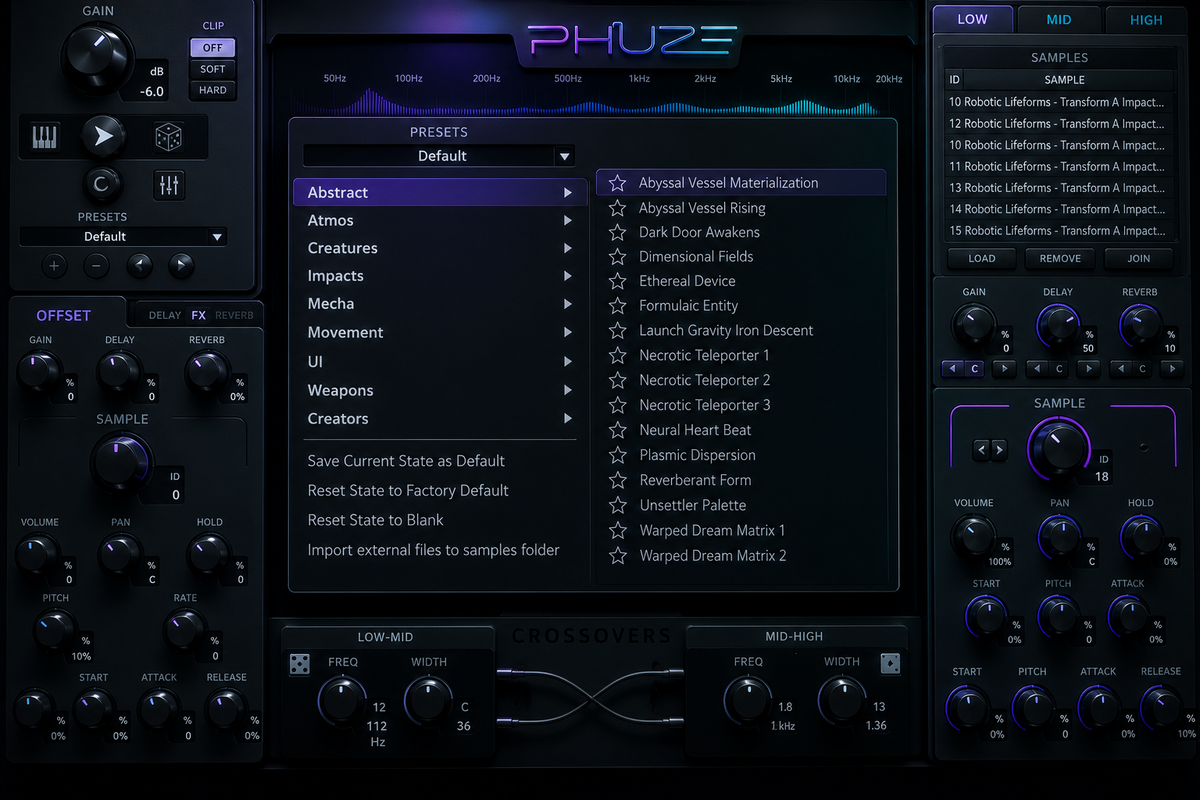
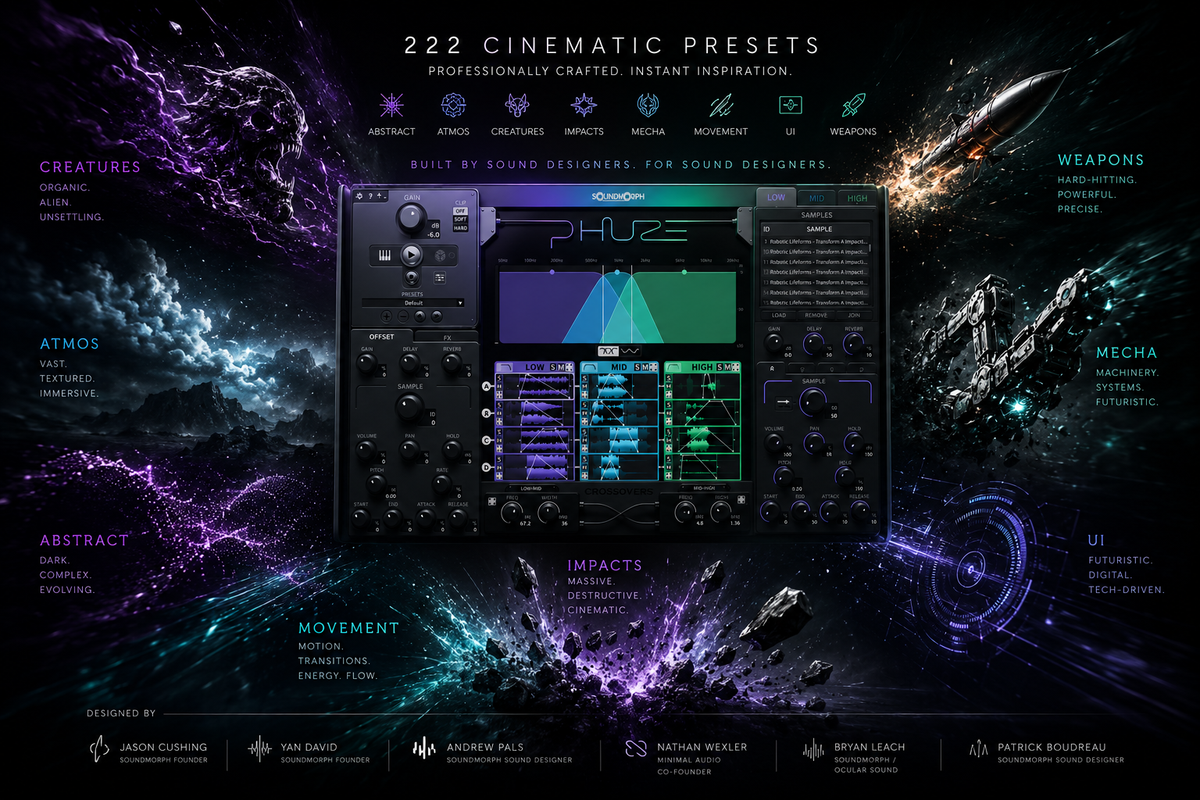
222 Cinematic Presets

PHUZE includes over 1GB of premium factory content and 700+ professionally designed source samples created specifically for the instrument. The included library was built from the ground up for cinematic layering, frequency interaction, and fast exploratory sound design across the following categories:

• Abstract
• Atmos
• Creatures
• Impacts
• Mecha
• Movement
• UI
• Weapons

Preset design by:
• Jason Cushing (SoundMorph Founder)
• Yan David (SoundMorph Founder)
• Andrew Pals (SoundMorph Sound Designer)
• Bryan Leach (SoundMorph / Ocular Sound)
• Nathan Wexler (Minimal Audio Co-Founder)
• Patrick Boudreau (SoundMorph Sound Designer)
Download Demo
Load video:

Sound Design Spotlight With Robert Dudzic

“When I first discovered PHUZE, I told SoundMorph, ‘I think this thing is really cool, and my audience would benefit from checking it out. I love that this one is made by sound designers for sound designers. It’s a very creative tool.’” — Robert Dudzic


With more than 25 years of experience in film, television, trailers, and game audio, Robert has created sound for projects including
GTA IV, Bad Boys: Ride or Die, The Tattooist of Auschwitz, DAMAGE, DAMAGE 2, and GRAVITY 2.

Load video:

Phuze Tutorial

A quick walkthrough of PHUZE’s core workflow, from loading samples and shuffling parameters to sculpting layered cinematic sounds in real time.

Load video:

Preset Walkthrough

Explore the full PHUZE factory library in this comprehensive presets walkthrough. From futuristic UI sounds and cinematic movement to weapons, mecha, impacts, textures, and atmospheres, this video showcases the incredible range of sounds possible with PHUZE and provides a great starting point for discovering your next favorite preset.

Load video:

Random Sounds. Huge Impacts.

SoundMorph contributor Bryan Leach loaded PHUZE with a collection of completely random sounds and transformed them into massive cinematic impacts using a simple XY pad performance in Reaper.

This demo showcases one of PHUZE's greatest strengths: turning unexpected source material into powerful, inspiring sound design in seconds.

Load video:

Designing UI Sounds

Watch PHUZE transform a visual logo into cinematic UI sound design in real time inside Pro Tools. Create futuristic interface movement, holographic textures, impacts, transitions, and layered sonic energy with speed and deep creative control.

PHUZE Factory Content Preview
SoundMorph ◯ Phuze - Plugin Factory Content Preview

Early PHUZE Reviews

Sound designers are already finding the flow.

★★★★★

Excellent for controlled serendipity

“Separating the source audio files into low, mid and high frequency ranges is genius. It helps so much to give definition to the resulting sounds.”

Gary H. · Verified · United Kingdom
★★★★★

A sound design beast

“You can create endless kinds of sounds which then you can use in your sound design. Highly recommended.”

Wojciech C. · Verified · Poland
★★★★★

Great creative tool

“Once you open it, you'll enter a state of flow, playing until you forget about time.”

Kuan C. · Verified · Taiwan
★★★★★

Great inspirational tool

“Fairly easy to get a grip and start creating.”

Verified Customer · Bulgaria

More Software Information

System Requirements

Minimum Requirements: A Mac with Mac OS X 10.11 (or later), OR a PC with Windows 10 (or later); Multicore processor; 16 GB RAM.

Manuals

Download here
  • 5 stars: 19 (76%)
  • 4 stars: 3 (12%)
  • 3 stars: 2 (8%)
  • 2 stars: 1 (4%)
  • 1 star: 0 (0%)
F
Francois H.O. (Mexico)
Game changing plugin!

What a game changer of a plugin this is! Simply amazing, I love how much creative stuff you can do with it right outside of the box! As always soundmorph coming up with incredible stuff!

R
Rob K. (Canada)
Amazing product that is so flexible for music

Amazing product that is so flexible for music and sound design!

G
Gordon R. (United States)
Very happy with this beast!

Very happy with this beast. Needed a few days to run it through its paces and while I'm nowhere near "expert," I've been able to breathe new life and intensity into prior designs. I've been creating for The Stage since 1985 and the stuff I've built with Phuze is already making several colleagues envious. :)

N
Naga (India)
Phuze delivered more than whai expected

Phuze delivered more than whai expected.
as a Sound Designer i am pretty happy with Designer elements and will keep using them further in my Projects

S
Szymon (United Kingdom)
I was hoping I can do more tonal sounds with it and maybe I can just need to find out more

I was hoping I can do more tonal sounds with it and maybe I can just need to find out more. ... No doubt this is high quality tool, but mainly for hits, whoosh , transition thing. Wish i could ask for refund. Don't get me wrong this tool is great just not for me, sorry

Thanks for checking out PHUZE and for the honest feedback. You’re right that it was designed first and foremost as a creative sound design tool, so impacts, transitions, creatures, UI, and abstract sounds are definitely its sweet spot. That said, there are quite a few tonal possibilities in there as well, and we’ll be sharing more examples over time. Thanks again for giving it a shot.

D
David M. (Canada)
Still getting to know it but having a blast so far

Still getting to know it but having a blast so far. Such a fun tool

A
Amo N. (Singapore)
nice

nice work

A
Anonymous (Japan)
To be honest, it's so-so

It's good for discovering unknown sounds, but it's painful to have to press the random button dozens to hundreds of times and fine-tune the Low, Mid, and High settings to find a suitable sound from your own effects.
Furthermore, the Low, Mid, and High effects have a limit of 60 each, so you have to carefully select the sounds you settle on, which is disappointing.
Even when raising the Gain up to a maximum of 6, the volume is still low, and most of the time, you have to increase it on other VSTs or the mixer side.

Thanks for the feedback and for spending time with PHUZE.

PHUZE was intentionally designed as an exploration and discovery tool, so finding unexpected results is a big part of the workflow. That said, we understand that some users prefer a faster path to specific outcomes, and we’re continuing to look at ways to improve browsing, selection, and workflow efficiency in future updates.

Regarding the output level, PHUZE is gain-staged conservatively to preserve headroom and help prevent clipping when layering sounds, but we appreciate the feedback and will continue evaluating this as the product evolves.

Thanks again for taking the time to share your thoughts. - SoundMorph Team

G
George H. (United States)
Has all the bells and whistles for sound designing

Has all the bells and whistles for sound designing. In future versions, I hope they give us the ability to edit the sample within the app. Lots of libraries these days have multiple samples in one file as opposed to separate files. This causes me to have to separate the sounds separately before importing to avoid having to change the start time after I shuffle.

We hear you, that would be nice! Loading larger files is going to be a different workflow than shorter ones right now, but we’ll see what we can do! Feel free to send suggestions to us at info@soundmorph.com too. Thank you!

M
MisterToad17.
Phuze is a great tool

Phuze is a great tool. I'm really enjoying using it.

M
Marc J. (United States)
Evil Twin dialed up to 11

I've been a big fan of SoundMorph's "Evil Twin" for years and this takes that idea and dials it past eleven. Such a delight to work with. You really can get usable surprises in the first random click.

For a future update, I'd love to have a 'render out' option or perhaps a drag and drop feature to place the generated audio on a timeline.

Really appreciate this, thank you! “Usable surprises” was honestly one of the biggest goals with PHUZE, so it’s awesome hearing that the randomization is landing the way we hoped.

Also great suggestion on the render out / drag-and-drop feature. We’ve definitely talked about workflow improvements like that internally already, especially for getting ideas onto a timeline faster inside DAWs. Really appreciate the thoughtful feedback and support!

K
Kristyna S. (Czechia)
Amazing tool for sound designers!

Amazing tool for sound designers! Makes sound layering easier and it's also fun creative. You can come up with amazing sound effects just in no time!

L
Leonid F. (Italy)
A very cool and flexible instrument! The sound is stunning

A very cool and flexible instrument! The sound is stunning, as always with everything SoundMorph makes! I'll be spending a long time figuring out the huge number of presets!

A
Alexei Z. (Russia)
Amazing SFX creation tool.

I just had only couple of days with Phuze and it saved me so much time! It has very straightforward design and easy workflow. You can create good sounding results when your project is very tight on time. But also, it can serve as a good starting point for a more complex sound design. I would like to have more effects on board with more crazy randomization, but it is a very solid product already!

E
Edgardo M. (Argentina)
Very nice piece of software!

Very nice piece of software! In the tradition of TimeFlux and WaveWarper 1.5 (which I prefer to version 2).

What do I like most?

The ability to mix up to twelve samples and edit them individually or,
incorporate your own samples, creating sound objects completely different from the presets.

The very simple interface with everything at a glance.

What would I like to see in the editing panel? A loop button, especially for creating longer drones and seeing the resulting sound process of combining 12 sounds with different durations. Think about it.

G
G.H. S. (The Netherlands)
A bit disapointing new instrument

On first site it looked interesting but the lay out is a bit confusing and it does not have the oppotunity to save your own created sounds

Thanks for the feedback, and sorry to hear PHUZE hasn’t fully clicked for you yet. Just to clarify, PHUZE absolutely does allow saving your own presets and sounds in the full version. The only limitation there is within demo mode.

That said, we really appreciate the honest feedback on the layout as well. PHUZE is definitely designed a bit differently from traditional instruments, and we’re already listening closely to user feedback for future improvements and workflow refinements.

If you have any questions about saving presets, workflow, or features you’d personally like to see added in future updates, feel free to reach out. We’re happy to help.

J
Jean-Francois M.
Deep inside SoundMorph's universe

One more time, SoundMorph gives to us the perfect tool to go very deep inside their sound design unique vision. Phuze is like being a SoundMorph designe. We have the hand to create our personal sound base on their original sound libraries, and the access to all possible knobs parameters for tweeking and getting our sound. The sound combinations give so much possibilities that the results are endless. I love Phuze, it sounds large, big, huge, unexpected. I would make 2 remarks: my MacPro 2019 28cores CPU go crazy and put it down most of the time. I which the MIDi command would pitch the sound following the note. Well don, Phuze is amazing.

J
Justin B.a.M.A. (United States)
Phuze brings new life to old samples -

Phuze adds another creative dimension to my current sample libraries. The ability to quickly mix, match, and layer audio for unexpected results, is very addictive and a lot of fun. It's a fantastic tool for sound design!

M
Marc S. (United States)
Phuze delivers the goods

As with all SoundMorph products, Phuze not only delivers great sounding results, but in a unique way that no other plugin/instrument does. Cheers Jason and team!

S
Simon D. (Australia)
Great for ambient sound design

Great for ambient sound design.
Like a cooking pot for samples..great time saver.

A
Anonymous
Cool

Cool plugin!!!

G
Gary H. (United Kingdom)
Excellent for controlled serendipity!

This plugin is great for making use of all the source recordings in your library, recombining them in ways you may not have imagined…
Separating the source audio files into low, mid and high frequency ranges is genius! It helps so much to give definition to the resulting sounds, or for carving out frequency areas for other sounds to occupy in a mix.
I shall certainly be using this as a regular part of my workflow…

A
Anonymous (Bulgaria)
Great inspirational tool

Great inspirational tool, fairly easy to get a grip and start creating!

W
Wojciech C. (Poland)
A sound design beast

The potential of the tool is so huge! At first it looks like a impact/accent/woosh or whatever sound mangler. If youlook closer you can create endless kinds of sounds which then you can use in your sound design. Highly recommended!

K
Kuan C. (Taiwan)
Great creative tool!

The interface is easy to understand; once you open it, you'll enter a state of flow, playing until you forget about time. 🔥

Load video:

Reveal Trailer

The official reveal trailer for PHUZE — a new cinematic sound design instrument built for fast experimentation, sonic exploration, and discovering sounds you would never create by hand.